Tap into the Visual Goldmine of Pinterest – A Massive Audience is Ready! Be One of the Few Marketers Leveraging This Platform for Traffic and Sales in Any Niche.
VERY few marketers have tapped into the explosive potential of Pinterest. Get in on the ground level and start leveraging this fast-growing platform to drive traffic and sales in any niche.
Pinterest is a visual discovery and social media platform with over 465 million monthly active users globally. It allows users to discover, share, and save creative ideas and inspiration through images and videos, often referred to as "Pins." Pinterest serves as both a social network and a search engine, helping users find everything from home décor and fashion to recipes and travel tips. Below are some key features and characteristics of Pinterest:
Key Features of Pinterest:
- Visual Search and Inspiration: Pinterest is centered around visual content, where users can discover ideas and inspiration on various topics through Pins, which link to external websites.
- Boards and Collections: Users can organize their Pins into custom boards, making it easy to curate ideas, plan projects, and save inspiration for later.
- Powerful Search Engine: Pinterest's search algorithm enables users to find content tailored to their interests, making it a powerful tool for both inspiration and discovery.
- Promoted Pins: Businesses and marketers can use Promoted Pins to reach a wider audience, allowing brands to showcase products and services directly in users' feeds.
- Shop the Look: Pinterest features tools like "Shop the Look," allowing users to purchase items directly from Pins, making it a strong platform for e-commerce.
- Rich Pins: Rich Pins provide extra information directly on the Pin itself, including product details, recipe ingredients, or article headlines.
- Pinterest Analytics: Pinterest offers analytics tools for businesses to track engagement, see audience insights, and optimize content for better performance.
- Global and Diverse Audience: With users from all around the world, Pinterest attracts a diverse community seeking content related to home decor, fashion, food, health, travel, and more.
- Privacy and Safety: Pinterest provides a variety of privacy options, including secret boards and the ability to control who sees and interacts with a user's Pins.
Welcome to PinBoost by Auto Engage A.I.
The ultimate automation tool for Pinterest, designed to help you save time, grow your audience, and dominate this rising social platform!
Are you ready to take your Pinterest presence to the next level? Imagine having a tool that automates your interactions, boosts your engagement, and frees up your time—all while leveraging cutting-edge AI technology.
Welcome to PinBoost by Auto Engage A.I., your all-in-one solution for social media automation on Pinterest!
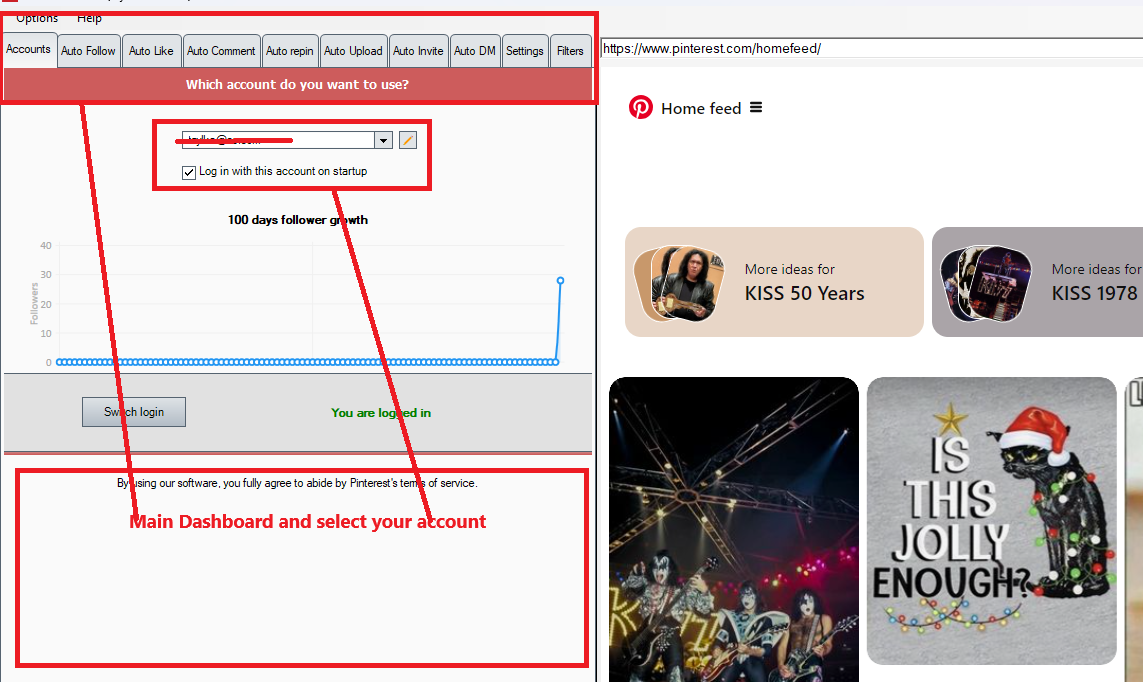
This is the Main dashboard where you sign into, the PinBoost application is embedded in Auto Engage A.I. application. You can do everything from here.
Revolutionize Your Engagement with These Powerful Features:
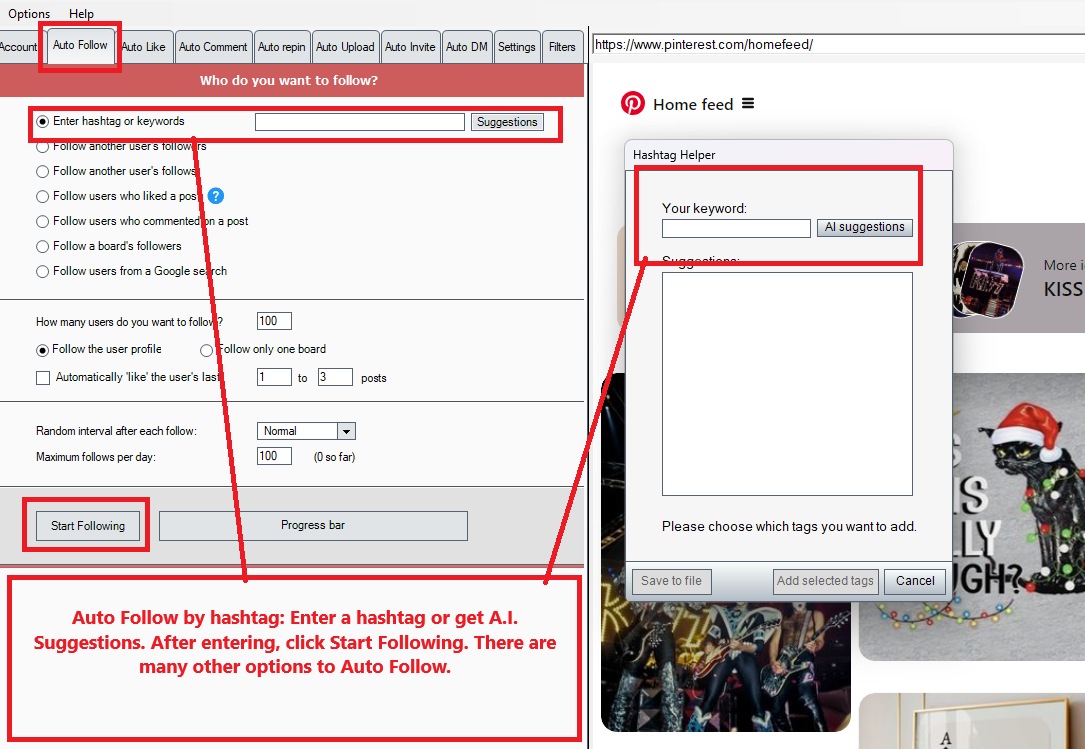
1. Follow with Precision
- Auto follow by hashtag, either enter it or have AI make suggestions.
- Follow another user's followers
- Follow another user's follows
- Follow user who liked a post
- Follow user who commented on a post
- Follow a board's followers
- Follow users from a Google search
2. Auto-Like and Follow
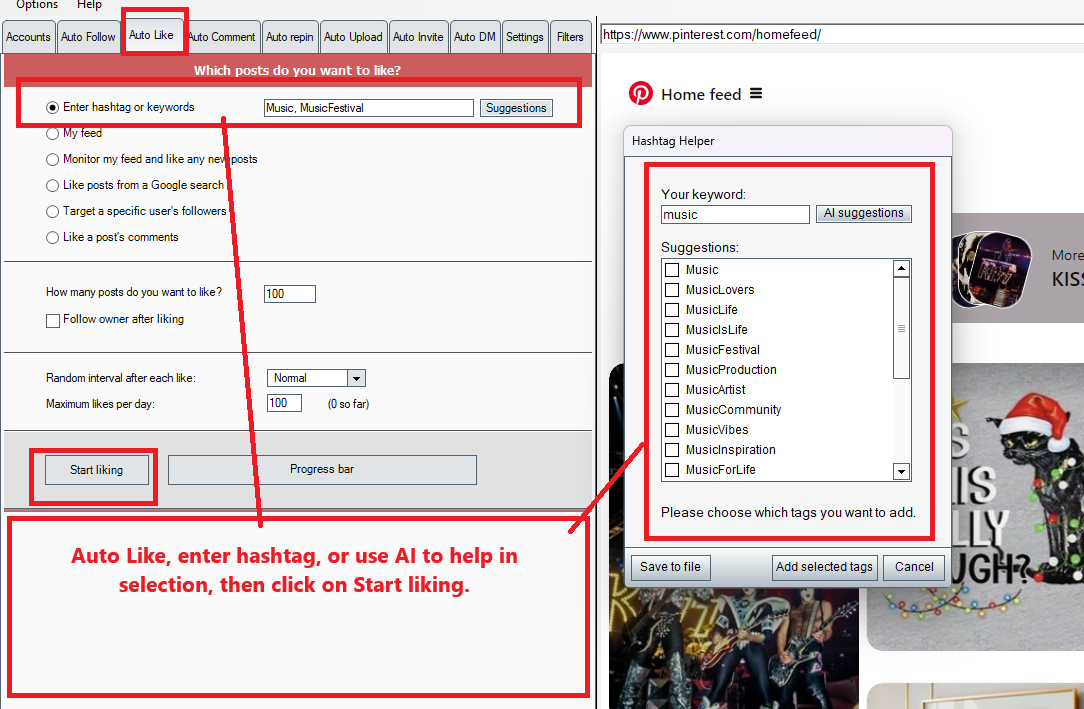
- Auto like by hashtag, either enter it or have AI make suggestions.
- My feed
- Monitor my feed and like any new posts
- Like posts from a Google search
- Auto like My feed
- Target a specific user's followers
- Like a post's comments
3. Auto-Commenting Made Easy
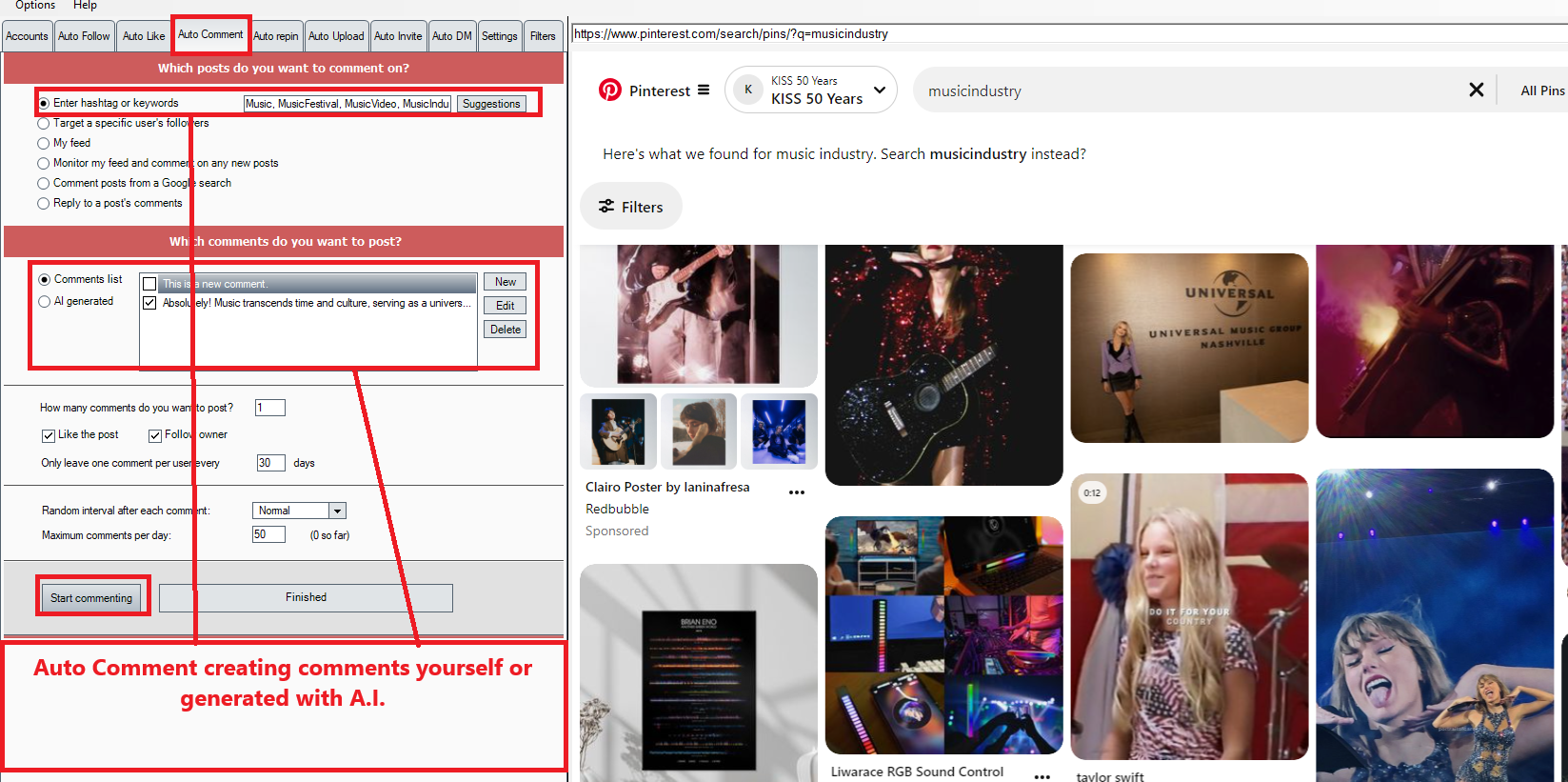
- Auto Comment by hashtag, either enter it or have AI make suggestions.
- Target a specific user's followers
- My Feed
- Monitor my feed and comment any new videos
- Comment posts from a Google search
- Reply to a post's comments
- Hashtag or Follower Targeting: Comment on posts using hashtags or target a specific user's followers.
- Customizable Comments: Create, edit, or delete comments to match your engagement style.
- AI-Powered Hashtags: Use AI to generate impactful hashtags for your comments.
Commenting on Pinterest means leaving a written remark or response on a specific pin. It's a way to engage with the content and its creator, build relationships, and contribute to discussions. Comments can range from compliments and questions to sharing personal insights or experiences related to the pin's topic.
Examples of How Commenting Is Used on Pinterest:
- Expressing Appreciation: "This recipe looks delicious! Can't wait to try it." — "Beautiful design—such a great idea for my living room!"
- Asking Questions: "What size knitting needles did you use for this pattern?" — "Do you have more tips on organizing a small pantry?"
- Offering Feedback: "I used this workout routine, and it worked great—thanks for sharing!" — "This DIY project saved me so much money—thank you!"
- Building Engagement: Engaging with other users' pins through meaningful comments can help grow your Pinterest presence, establish connections, and drive traffic back to your own content.
Best Practices for Commenting:
- Be Genuine: Write thoughtful and authentic comments to make a positive impression.
- Avoid Spam: Don't post irrelevant comments or promotional links, as this could harm your credibility and violate Pinterest's guidelines.
- Stay Positive: Comments on Pinterest are often kind and constructive, keeping the platform's community-friendly vibe.
Commenting thoughtfully can help you stand out and build a stronger presence on Pinterest.
AI Generated Comments, or you can create your own.
4. Auto Repin
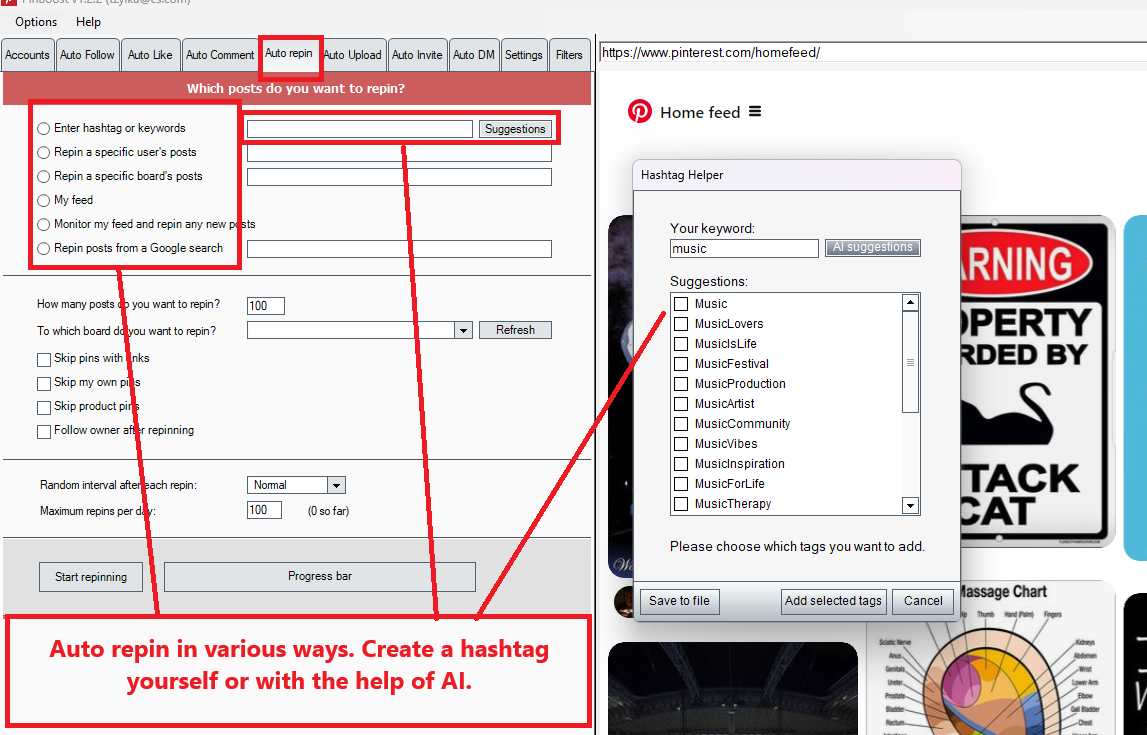
Auto-repining on Pinterest means automatically sharing (or "repining") content from other users' boards or pins onto your own boards. This feature is often part of social media automation tools designed to increase engagement, grow followers, and keep your Pinterest profile active with fresh content.
Here's how auto-repining typically works:
- Targeted Content: You can set criteria such as specific keywords, hashtags, or boards, ensuring the tool repins relevant content that aligns with your niche or audience interests.
- Scheduled Posting: The tool automatically repins content at intervals, maintaining a consistent activity level on your account.
- Audience Engagement: By repining others' content, you can build relationships, encourage reciprocal interactions, and provide value to your followers by curating high-quality pins.
It's important to use this feature responsibly to avoid spamming and to ensure the content aligns with your brand's message and goals.
5. Auto Upload
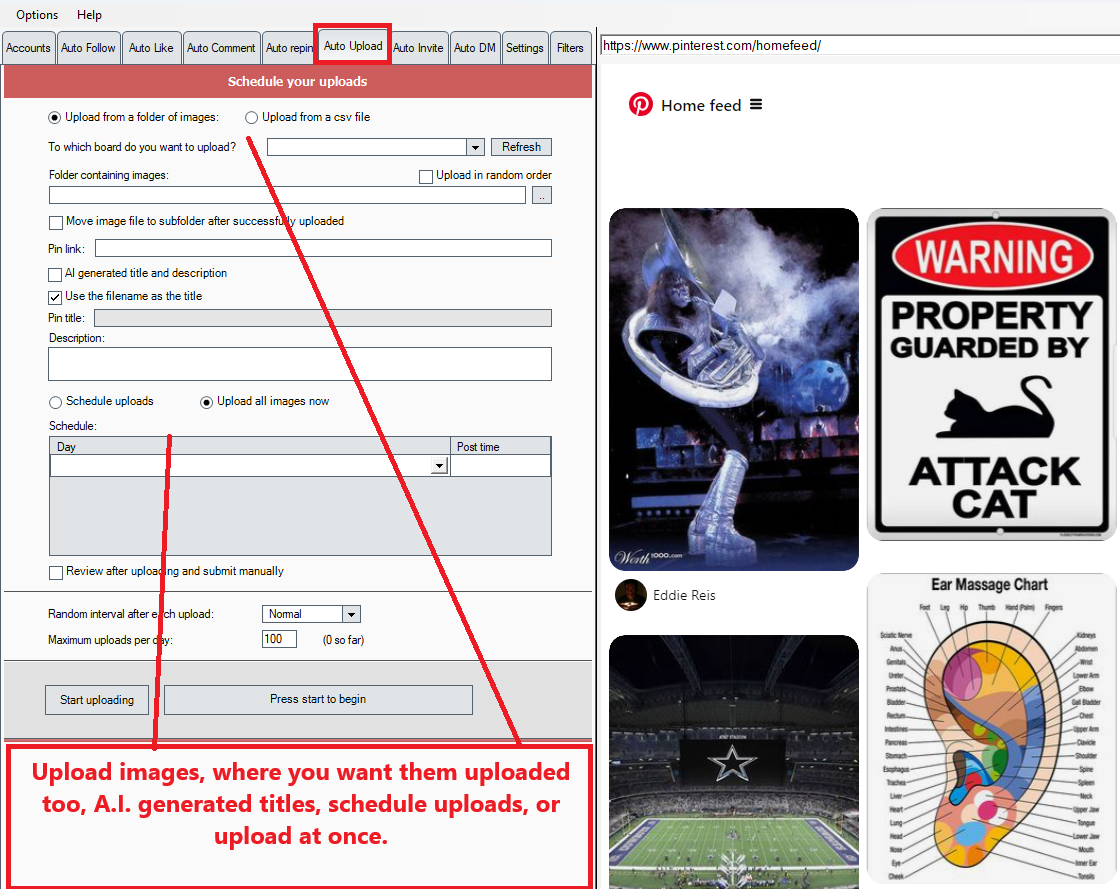
Auto-uploading on Pinterest refers to using automation tools or software to schedule and publish your own original content (pins) to Pinterest automatically, without manual intervention. This feature is commonly used by marketers, bloggers, and businesses to maintain an active presence on the platform and to share content at optimal times for engagement.
How Auto-Uploading Works:
- Content Scheduling: You upload images, videos, and descriptions in advance to an automation tool. The tool schedules the content to be published at specific times based on your preferences or analytics data.
- Pin Customization: Each pin can include a title, description, destination link, and relevant keywords or hashtags for SEO and discoverability. Tools may allow for bulk uploads, saving time when posting multiple pins.
- Consistent Posting: Auto-uploading ensures a steady flow of content, which can help improve visibility and engagement with your audience.
- Cross-Board Pinning: You can auto-upload the same pin to multiple boards, tailoring each version to fit the board's theme (if relevant).
Benefits of Auto-Uploading:
- Time Efficiency: Saves time by automating repetitive tasks.
- Improved Reach: Posts can be scheduled for times when your target audience is most active.
- Content Organization: Helps maintain a consistent look and feel across your pins and boards.
Best Practices for Auto-Uploading:
- Follow Pinterest Guidelines: Ensure pins comply with Pinterest's policies to avoid issues like account suspension.
- Use High-Quality Content: Upload visually appealing images and videos that resonate with your audience.
- Monitor Performance: Even with automation, regularly check engagement metrics to refine your strategy.
- Avoid Overposting: Balance automation with manual interaction to keep your account authentic and community-focused.
Auto-uploading is a powerful tool when used responsibly and strategically, helping you scale your efforts on Pinterest while saving time.
6. Auto Invite
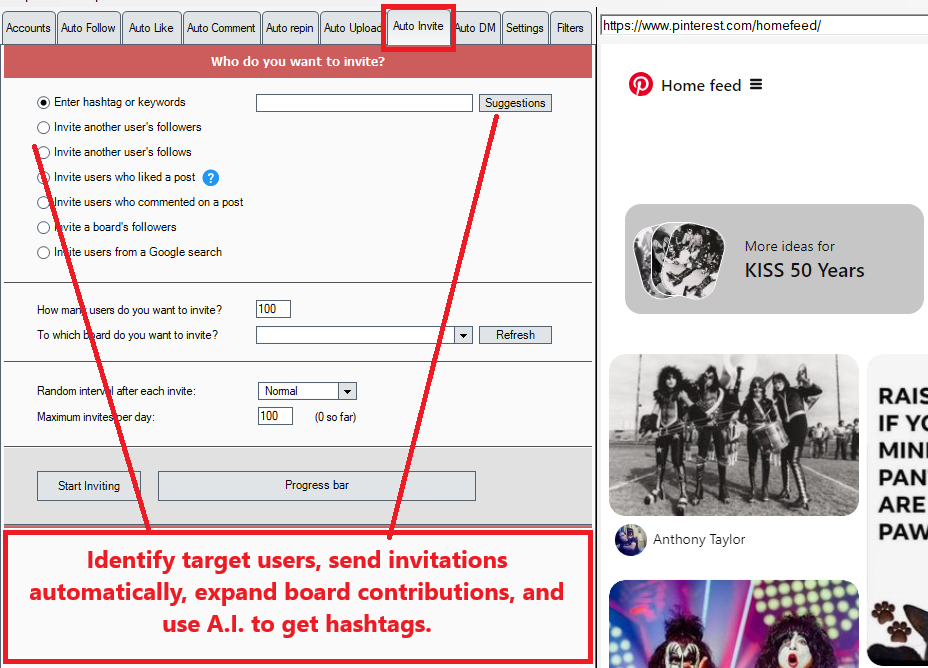
Auto-inviting on Pinterest typically refers to the process of using automation tools to invite other users to collaborate on your group boards. Group boards are a feature on Pinterest that allow multiple users to pin content to the same board, fostering collaboration and increasing the visibility of the board's content to a wider audience.
How Auto-Inviting Works:
- Identify Target Users: The tool identifies Pinterest users who match specific criteria, such as those who follow your account, engage with your pins, or have relevant interests.
- Send Invitations Automatically: The automation tool sends personalized invitations to these users, asking them to join and contribute to your group boards.
- Expand Board Contributors: Once users accept the invite, they can pin their own content to your group board, enhancing its diversity and activity level.
Benefits of Auto-Inviting:
- Grow Board Activity: More contributors mean more pins, which can attract more viewers and followers.
- Increase Engagement: Collaborative boards are more dynamic and engaging, appealing to a broader audience.
- Save Time: Automating the invitation process reduces the manual effort of finding and inviting potential collaborators.
Best Practices for Auto-Inviting:
- Target the Right Users: Focus on inviting users who share relevant interests or have a strong presence in your niche.
- Avoid Over-Inviting: Sending too many invitations can appear spammy and harm your reputation on the platform.
- Maintain Board Quality: Monitor the content contributors pin to ensure it aligns with your board's theme and quality standards.
- Follow Pinterest Policies: Ensure the automation tool complies with Pinterest's rules to avoid penalties or account suspension.
Auto-inviting can help you efficiently grow your Pinterest presence and foster collaborations, but it should be used thoughtfully to maintain authenticity and community engagement.
7. Direct Messaging Automation
Direct messaging (DM) on Pinterest means sending a private message to another user through the platform. This feature allows for one-on-one communication, making it easier to connect, collaborate, or share ideas directly without posting publicly.
Common Uses of Direct Messaging on Pinterest:
- Sharing Pins: You can send specific pins to other users via DM, making it easy to share ideas, inspiration, or products.
- Collaborating: Messaging can be used to coordinate with others, such as contributors to a group board or collaborators on a project.
- Building Relationships: Brands, influencers, or individuals can use DMs to engage personally with followers or potential customers.
- Customer Support: Businesses on Pinterest can respond to inquiries or provide assistance through direct messages.
- Promoting Products or Services: While less common due to Pinterest's focus on inspiration rather than direct selling, businesses can use DMs for soft marketing, such as sharing product links or special offers.
Automated Direct Messaging (Auto-DM):
- Send welcome messages to new followers.
- Share pins or links to targeted users.
- Promote group board invitations.
While automation can save time, it's important to use it carefully to ensure messages are personalized, non-spammy, and in compliance with Pinterest's policies. Misuse of direct messaging can lead to account restrictions or penalties.
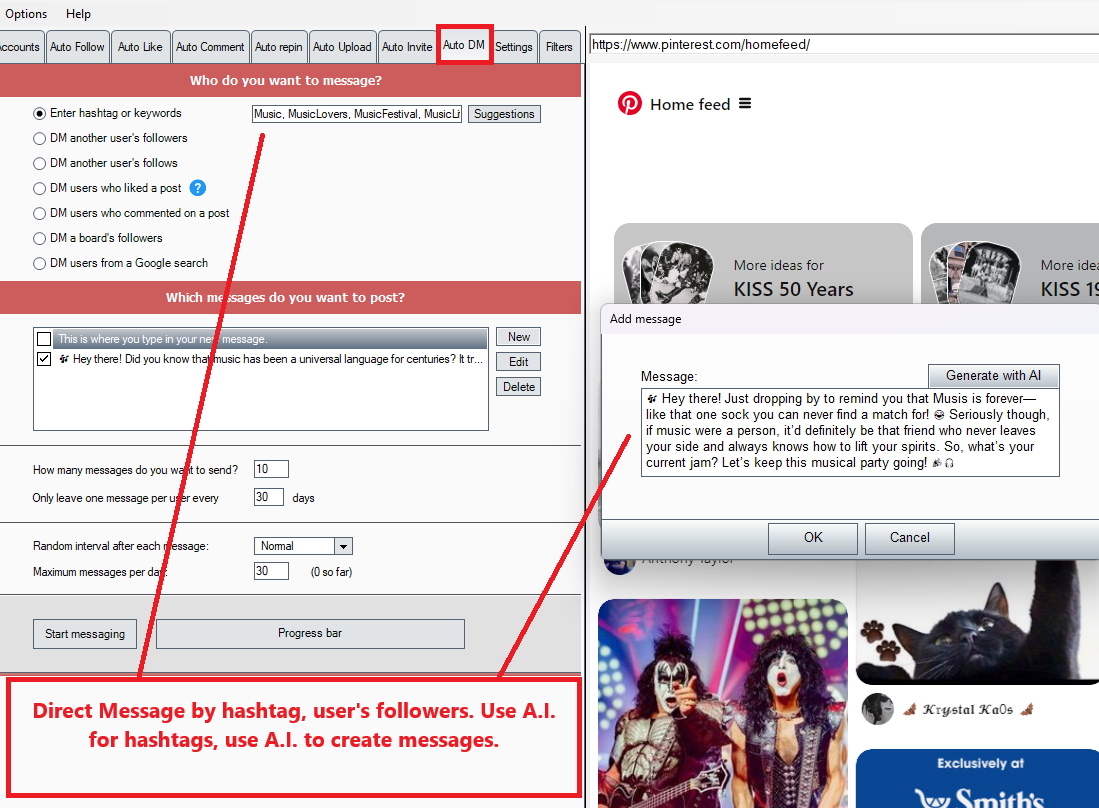
- Personalized Outreach: Auto-direct messages to users by hashtags or specific followers.
- Flexible Messaging: Create, edit, or delete messages to ensure personalized communication.
- AI-Enhanced Targeting: Rely on AI to find the best hashtags for direct messaging.
Why Choose PinBoost by Auto Engage A.I.?
- Save Time: Automate repetitive tasks and focus on what truly matters—creating great content and engaging with your audience.
- Boost Engagement: Increase your visibility and interactions effortlessly with automation.
- Stay Ahead: Use the power of AI to create content and hashtags that keep you ahead of the competition.
- Customize Your Approach: Tailor your comments and messages to resonate with your audience for maximum impact.
The PinBoost by Auto Engage A.I. Software Bundle for PinBoost.
Yes, I want to grow my Pinterest with A.I.
The Fastest Way to Pinterest connection and profits.
OR grab all 5 software for only $97.00 in the MegaBoost Bundle. click here
30-Day Money-Back Guarantee

I'm confident that when you get your hands on PinBoost by Auto Engage A.I., you can start connecting and increases your following immediately, rest assured; this is a risk-free investment. Once you have secure access, you have 30 days to explore. If you're not completely thrilled, ask for a refund. Please reach out to me at the email below to request a refund. The refund will take a maximum of 48 hours. Do not open a PayPal dispute.
If you also need help, don't hesitate to get in touch with me through my email address tczylka@gmail.com
Testimonials
"With Auto Engage A.I. I was able to increase my followers and improve my interactions on TikTok, Instagram, Gab, Truth and GETTR, Pinterest" -- Tom Y.
"A must-have tool for anyone serious about growing their presence on Pinterest" -- Bob W.
"The automation features are top-notch. I can engage with my audience while focusing on other tasks." -- Sarah L.
Case Studies of people using the Pinterest Platform. We can help all users on Pinterest, by increasing their auto liking, auto following, communicating with direct messages and using A.I for creating messages.
You can do this!
Why more users? More users equal more leads for your products and solutions. Tap into more traffic.
You do NOT need to be young, funny, sexy, or fashionable to be popular on Pinterest! You can promote yourself and your business visually!
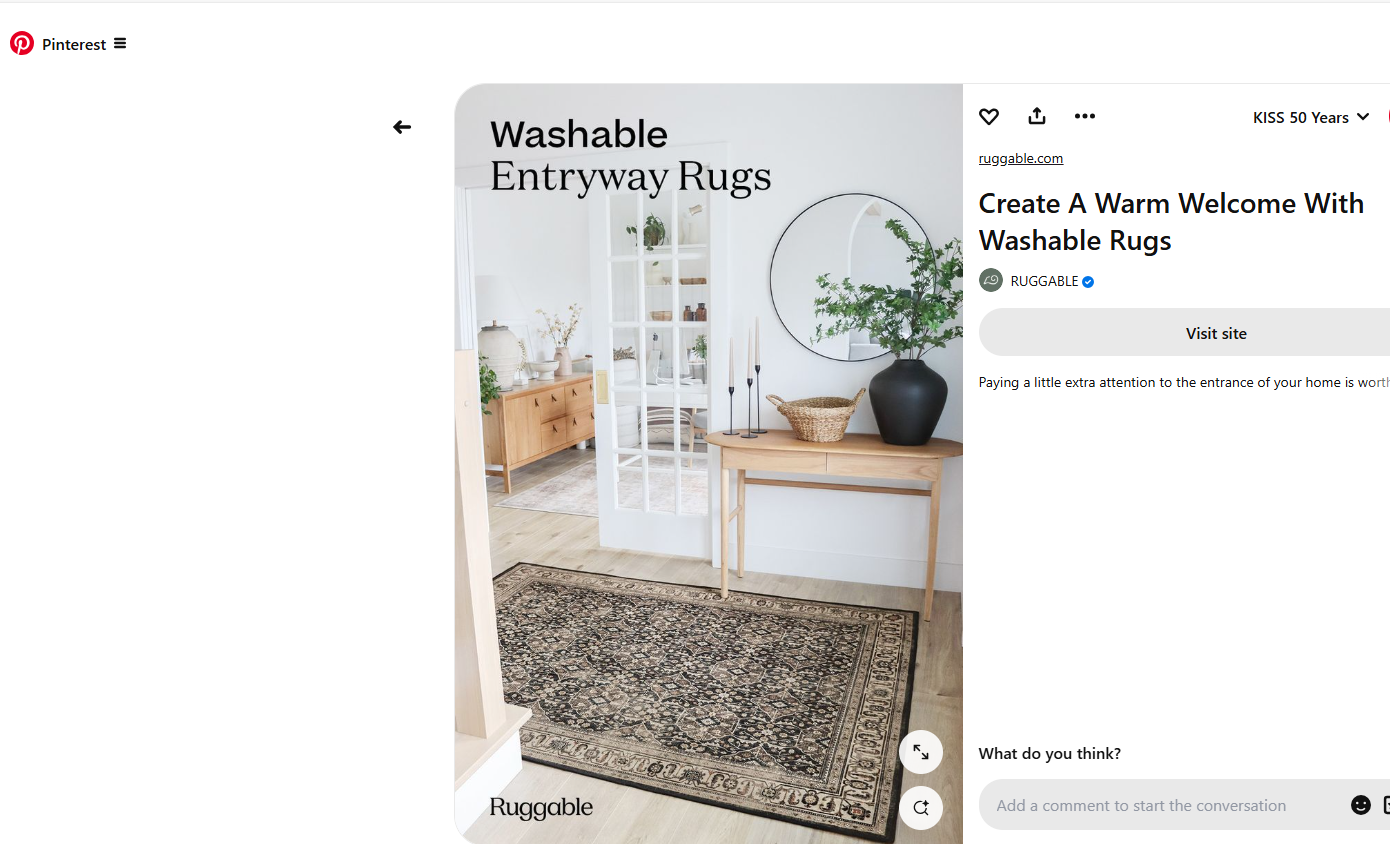
Example 1: Ruggable
Ruggable, known for its washable rugs, uses Pinterest to showcase various rug designs and styling tips. Their boards are organized by themes, colors, and room types, providing inspiration for home decor enthusiasts.
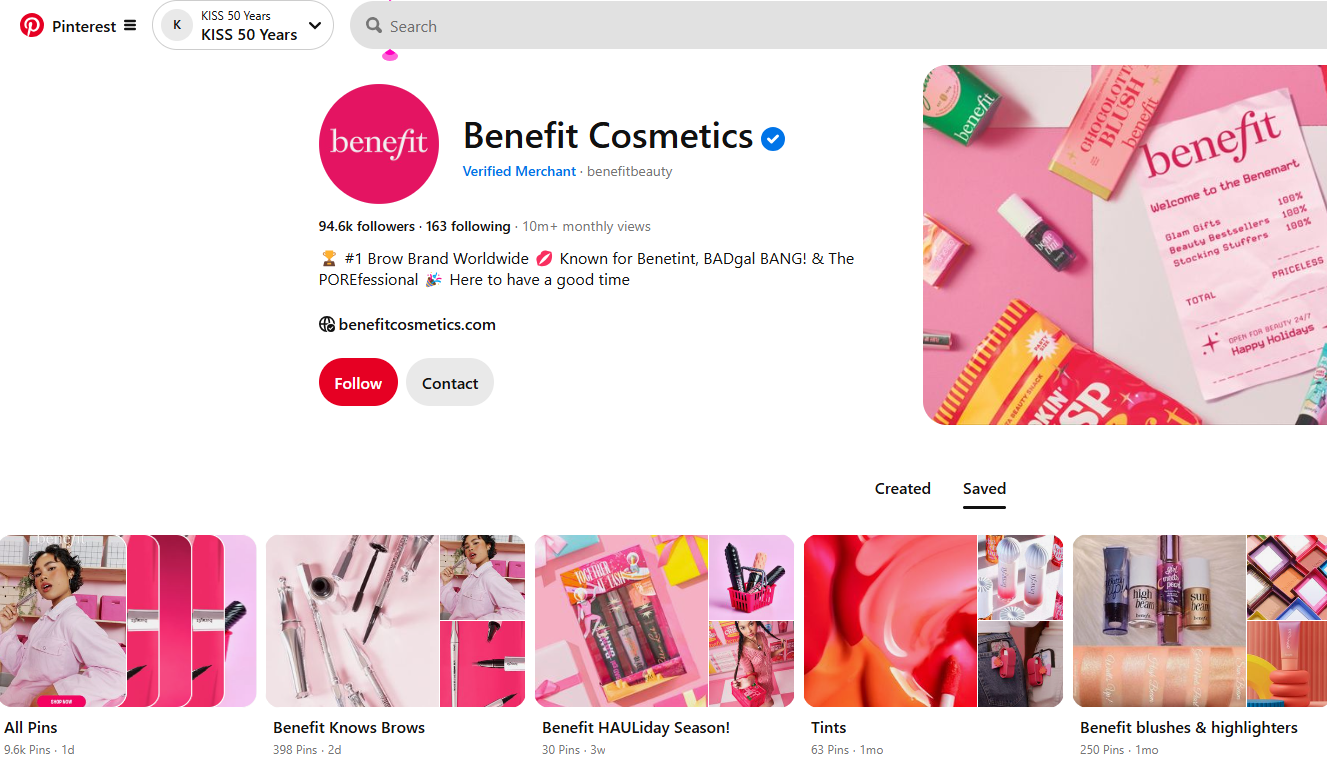
Example 2: Benefit Cosmetics
Benefit Cosmetics maintains an on-brand aesthetic across their Pinterest boards, featuring makeup tutorials, product showcases, and beauty tips. Their visually appealing pins align with their brand identity, attracting beauty enthusiasts.
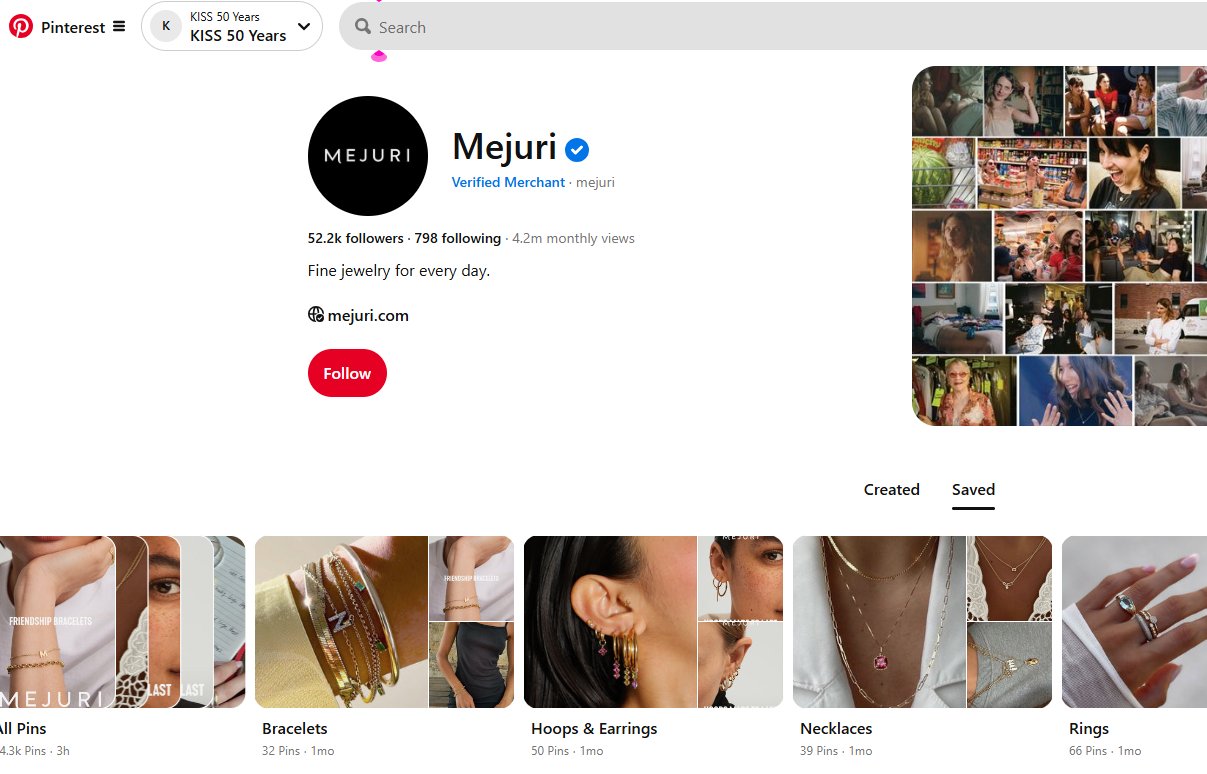
Example 3: Mejuri
Mejuri, a jewelry brand, uses Pinterest to display their products through high-quality images and user-generated content. Their boards include style inspiration, customer photos, and behind-the-scenes glimpses, fostering a community around their brand.
Yes, I want to grow my Pinterest with A.I.
The Fastest Way to Pinterest connection and profits.
OR grab all 5 software for only $97.00 in the MegaBoost Bundle. click here
30-Day Money-Back Guarantee

I'm confident that when you get your hands on PinBoost by Auto Engage A.I., you can start connecting and increases your following immediately, rest assured; this is a risk-free investment. Once you have secure access, you have 30 days to explore. If you're not completely thrilled, ask for a refund. Please reach out to me at the email below to request a refund. The refund will take a maximum of 48 hours. Do not open a PayPal dispute.
If you also need help, don't hesitate to get in touch with me through my email address tczylka@gmail.com
Summary of Features:
- Automated Following: Follow users by targeting followers or hashtags, powered by AI.
- Auto-Like and Follow: Like posts by hashtags and follow the owners, using AI-generated hashtags.
- Target Followers of Influencers: Enter a username to target specific followers with AI insights.
- Auto Repin: Automatically sharing (or "repining") content from other users' boards or pins onto your own boards.
- Auto-Commenting: Post comments by hashtags or specific followers with customizable options and AI-driven hashtags.
- Auto upload: Schedule and publish your own original content (pins) to Pinterest automatically, without manual intervention.
- Auto Invite: Using automation to invite other users to collaborate on your group boards.
- Direct Messaging: Send auto-direct messages by hashtags or specific followers with flexible messaging and AI enhancement.
Transform your Pinterest presence with PinBoost by Auto Engage A.I. —where automation meets intelligence!
Thanks, and I cannot wait to hear about all your Success.
Thad

P.S. - The opportunity is massive, but only if you act now. Don't miss your chance to dominate this platform. With PinBoost by Auto Engage Us, you have nothing to lose and millions of followers to gain.
P.P.S. - This software suite is exclusive to our customers. Once you're in, you'll have access to the same tools we used to grow our accounts exponentially. Don't wait—grab your copy today!
FAQ's - Frequently Asked Questions
How does Auto Engage Us work?
PinBoost by Auto Engage A.I. automates your social media interactions on Pinterest helping you grow your following effortlessly. You will be given the opportunity to purchase other automation social media tools in the sales funnel.
Do I need any technical skills?
No technical skills are required. Our user-friendly dashboard makes it easy for anyone to use.
What are the System Requirements?
This is a Windows program. The system requirements are low; the program just simulates what you do on your regular Web Browser. If you have 4GB of RAM, that would be enough; more is always better. You need Windows 10 or above.
What If I do not have Windows?
There are tools available, such as Virtual PC, that you can use to install Windows software on a Mac. You could also install the software on a Windows VPS. That is a great option because it runs "on the cloud," and you can leave it running 24/7. When you purchase, we will have more details about this in the training area.
Another alternative is Windows 365 Cloud PC, an official Microsoft product that runs Windows 11. Since it's a legitimate Microsoft service, it's far less likely to be blocked by Instagram. Pricing starts at $31 per month.
Do you have a Facebook Community?
Yes, we will have a group for our customers to join, share experiences, ask questions, and network with others. You will find more about this in the Training area as a customer.
What does the Price Include?
With this offer you will get the ability to put PinBoost by Auto Engage Us on 3 computers. On each computer you can have multiple accounts on Pinterest. If you want to move your license from computer to computer, you can deactivate and reactivate on another computer. We offer updates for 5 Years.